
Public API Reference
Complete API reference for accessing your Kensaku AI PSEO project data via REST API. Includes examples for JavaScript, PHP, and cURL.
Overview
Expose your PSEO project data as a JSON API endpoint. Perfect for headless CMS setups, static site generators, or any custom integration.
The API follows JSON:API 1.1 specification.
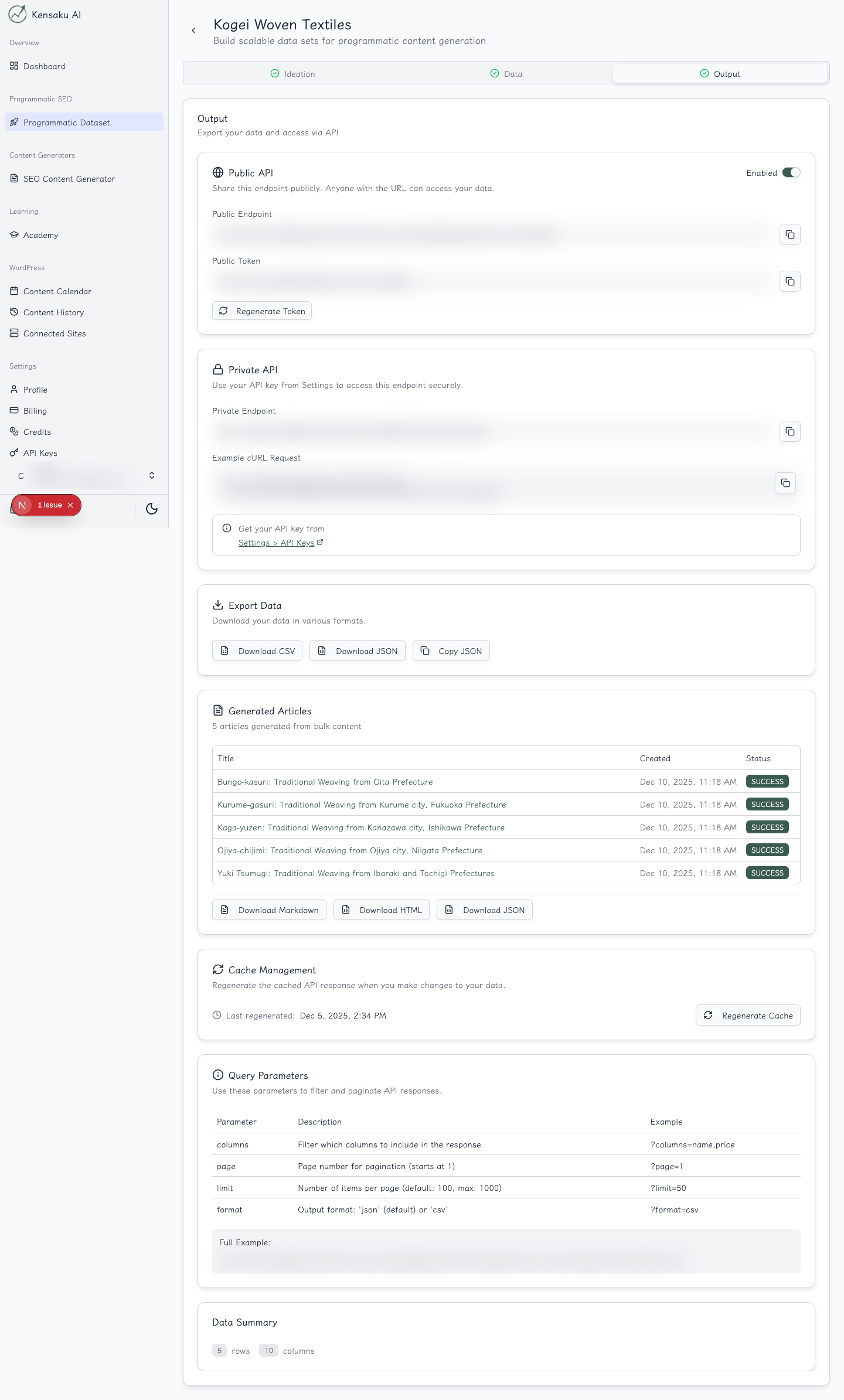
Quick Start
- Go to your PSEO project → Output tab
- Enable Public API and click Generate Token
- Your endpoint:
https://kensakuai.com/api/pseo/public/{token}
Query Parameters
| Parameter | Description | Default |
|---|---|---|
page[number] | Page number | 1 |
page[size] | Items per page (max 1000) | 100 |
fields[row] | Select specific columns | All |
format | json or csv | json |
Examples:
# Get page 2 with 50 items
?page[number]=2&page[size]=50

# Only fetch name and image columns
?fields[row]=name,image

# Export as CSV
?format=csv
Response Format
{
  "jsonapi": { "version": "1.1" },
  "data": [
    {
      "type": "row",
      "id": "1",
      "attributes": {
        "title": "Example Item",
        "description": "Some text content...",
        "image": {
          "url": "/api/cdn/media/...",
          "alt": "Image description",
          "date": "2025-12-03T04:36:58Z"
        },
        "location": {
          "placeId": "ChIJ...",
          "name": "Store Name",
          "embed": "https://kensakuai.com/api/maps/embed?..."
        }
      }
    }
  ],
  "meta": {
    "columns": [{ "name": "title", "type": "text" }],
    "totalRows": 100,
    "cacheGeneratedAt": "2025-12-05T03:34:45Z"
  },
  "links": {
    "self": "...",
    "first": "...",
    "last": "...",
    "prev": null,
    "next": "..."
  }
}
Data Types
| Type | Format |
|---|---|
text | String |
image | { url, alt, date } |
location | { placeId, name, embed } |
Usage Examples
Basic Fetch (JavaScript)
const response = await fetch('https://kensakuai.com/api/pseo/public/{token}');
const { data, meta, links } = await response.json();

// Access items
data.forEach(item => {
  console.log(item.attributes.title);
});

// Check for more pages
if (links.next) {
  // Fetch next page
}
With Pagination
async function fetchAllData(token) {
  let url = `https://kensakuai.com/api/pseo/public/${token}`;
  let allItems = [];

  while (url) {
    const { data, links } = await fetch(url).then(r => r.json());
    allItems.push(...data);
    url = links.next;
  }

  return allItems;
}
Static Site Generation (Next.js / Astro / etc.)
// Fetch at build time
export async function getStaticProps() {
  const res = await fetch(API_URL);
  const { data } = await res.json();

  return {
    props: {
      items: data.map(item => item.attributes)
    }
  };
}
WordPress / PHP
$response = wp_remote_get('https://kensakuai.com/api/pseo/public/{token}');
$body = json_decode(wp_remote_retrieve_body($response), true);

foreach ($body['data'] as $item) {
    $attrs = $item['attributes'];
    echo "<h2>{$attrs['title']}</h2>";
}
cURL
curl "https://kensakuai.com/api/pseo/public/{token}?page[size]=10"Working with Images
Image URLs are relative. Prepend the domain:
const fullUrl = `https://kensakuai.com${item.attributes.image.url}`;Working with Locations
The embed field contains an iframe URL for Google Maps:
<iframe src="{location.embed}" width="600" height="450"></iframe>Caching
- Data is cached until you click Regenerate Cache
- Check
meta.cacheGeneratedAtto see when data was last updated - API responses are CDN-cached for 1 hour
Security
- Endpoints are public (no auth required)
- Token provides obscurity, not security
- Only expose data intended for public consumption
- Disable the toggle to revoke access immediately
Troubleshooting
| Issue | Solution |
|---|---|
| Empty data | Regenerate cache after adding rows |
| Images not loading | Prepend https://kensakuai.com to URLs |
| Pagination not working | Use page[number] and page[size] format |
Ready to Scale Your Content?
100+ pages in 1 click with Kensaku AI. Start your programmatic SEO campaign today.