Location-based SEO is one of the most reliable programmatic SEO strategies. If you rank for "plumber in Austin", that same template could work for "plumber in Dallas", "plumber in Houston", and hundreds of other cities. The challenge? Manually creating all those keyword variations is tedious and time-consuming.
Our free Location Keyword Expander solves this by instantly generating location-targeted keywords at scale.
What is Location Keyword Expansion?
Location keyword expansion takes a seed keyword and combines it with a list of locations to create every possible variation. Instead of manually typing out "plumber in New York", "plumber in Los Angeles", "plumber in Chicago"... you generate the entire list in seconds.
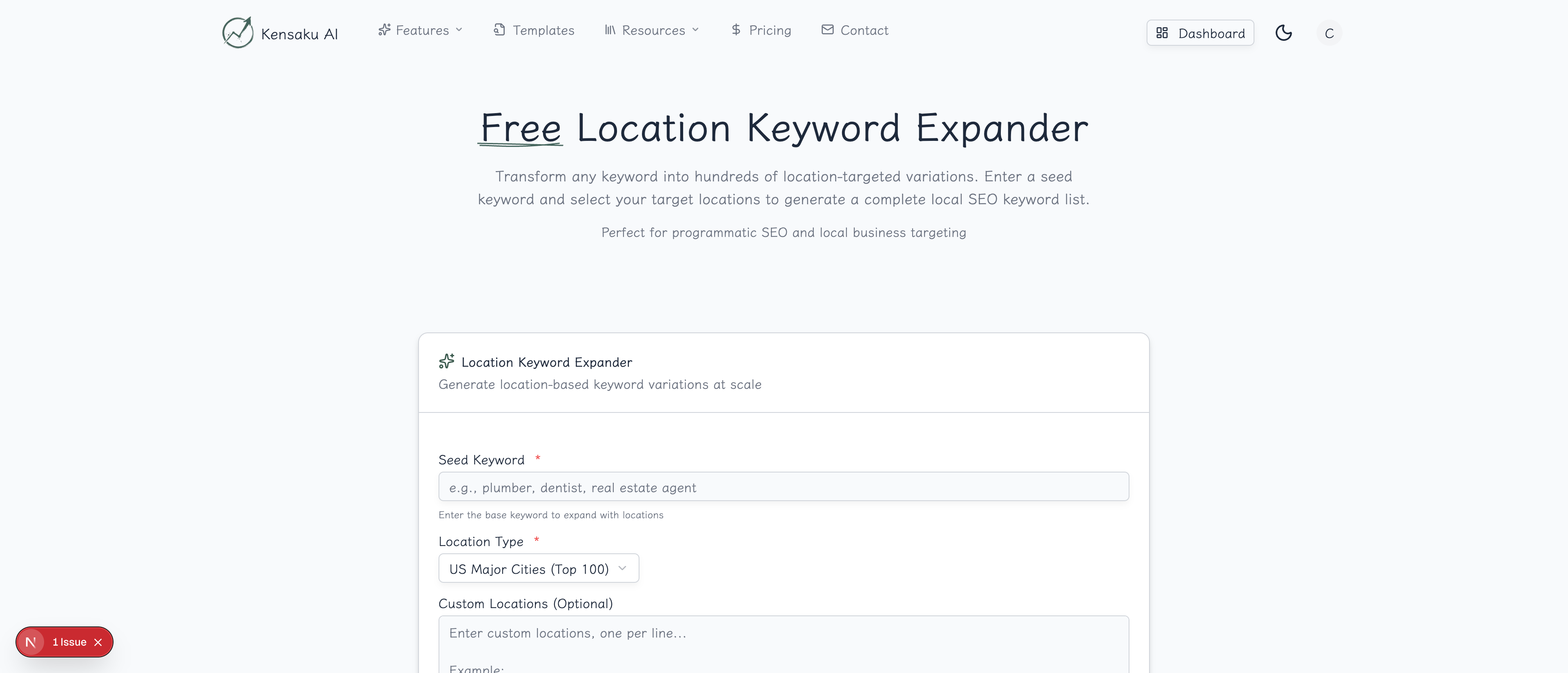
How the Tool Works
Step 1: Enter Your Seed Keyword
Type the base keyword you want to expand. This works best with:
- Service-based keywords: plumber, dentist, lawyer, accountant
- Product keywords: furniture store, car dealership, coffee shop
- Activity keywords: hiking trails, restaurants, things to do
Step 2: Select Location Type
Choose from pre-built location lists:
- US Major Cities (Top 100): Population-ranked US cities
- US States: All 50 states plus DC
- UK Cities: Major cities across the United Kingdom
- Canada Cities: Top Canadian metropolitan areas
- Australia Cities: Major Australian cities
- World Capitals: Capital cities globally
- Custom Locations: Your own list
Step 3: Choose Keyword Format
Select how keywords should be structured:
[keyword] in [location]→ "plumber in Austin"[location] [keyword]→ "Austin plumber"[keyword] near [location]→ "plumber near Austin"[keyword] [location]→ "plumber Austin"best [keyword] in [location]→ "best plumber in Austin"All Formats→ Generate every variation
Step 4: Generate and Export
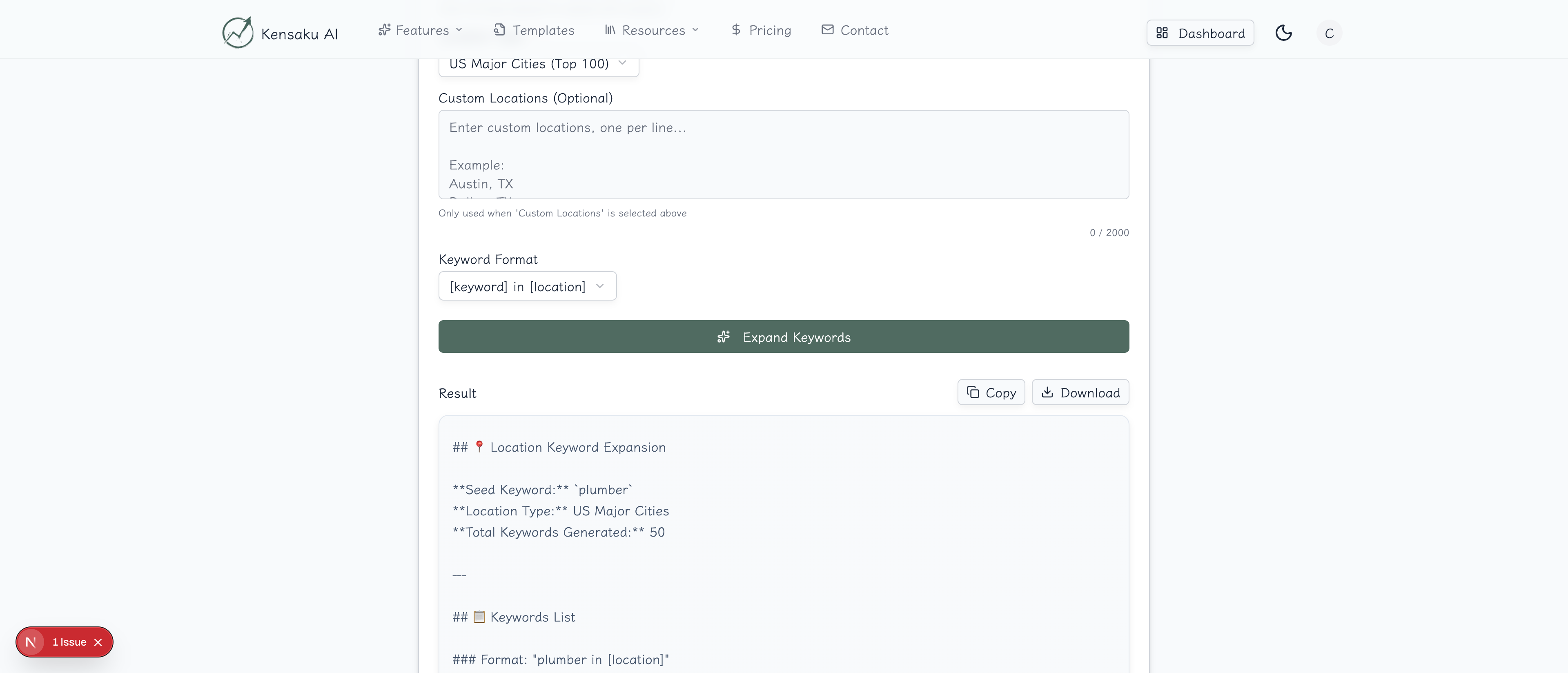
Click "Expand Keywords" and receive your complete list. Export options include:
- Copy to clipboard
- Download as text file
- Formatted markdown for planning
Real Example: Expanding "Plumber"
We tested the tool with "plumber" as the seed keyword, targeting US Major Cities:
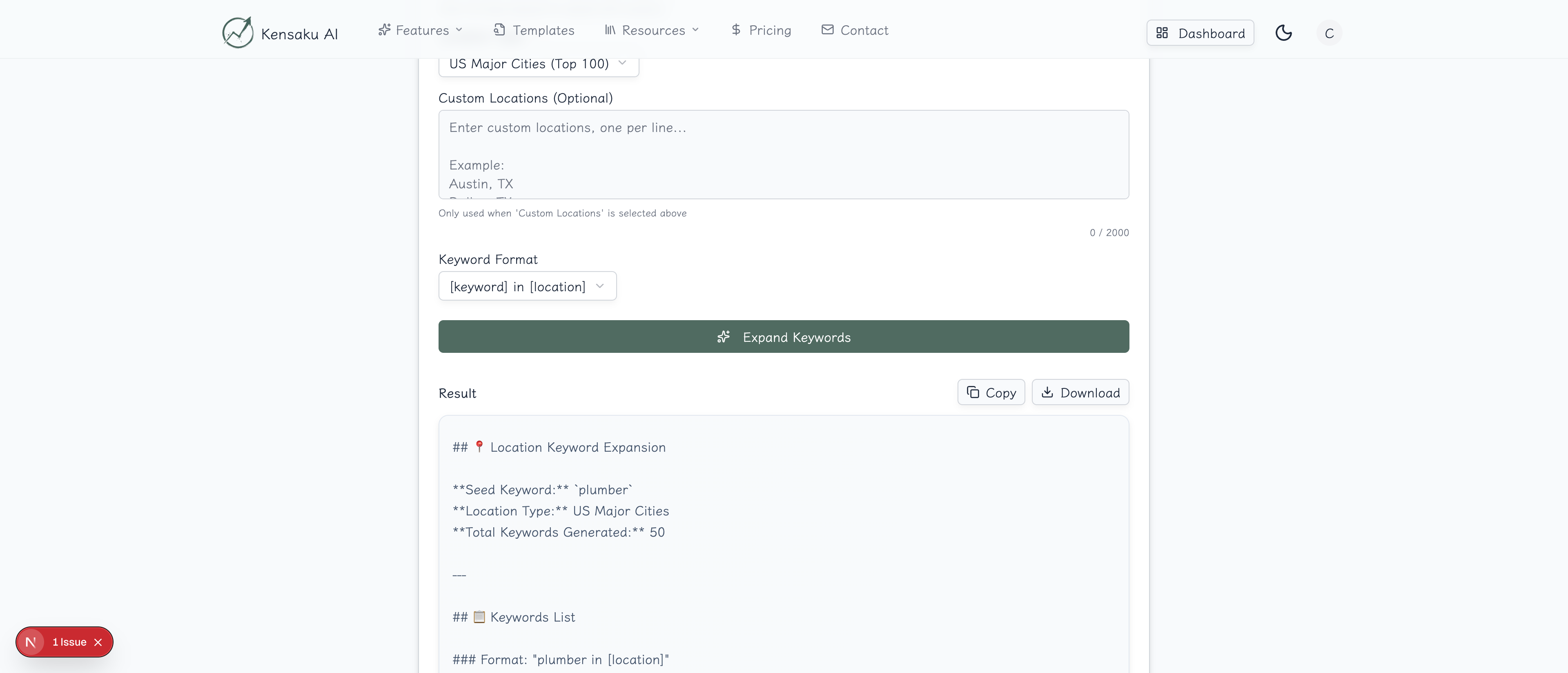
Results Generated: 50 location-targeted keywords
plumber in New York
plumber in Los Angeles
plumber in Chicago
plumber in Houston
plumber in Phoenix
plumber in Philadelphia
plumber in San Antonio
plumber in San Diego
plumber in Dallas
plumber in San Jose
...
With the "All Formats" option, this becomes 300+ keyword variations from a single seed keyword.
Use Cases for Location Expansion
Local Service Businesses
Perfect for any business that serves multiple locations:
- Home services: plumbers, electricians, HVAC, landscaping
- Professional services: lawyers, accountants, consultants
- Healthcare: dentists, chiropractors, therapists
- Real estate: agents, property management, home inspectors
Directory and Marketplace Sites
Build comprehensive location pages:
- "Best restaurants in [city]"
- "Top-rated hotels in [city]"
- "Things to do in [city]"
- "Cost of living in [city]"
Franchise and Multi-Location Businesses
Create location-specific landing pages:
- "Pizza delivery in [city]"
- "Car rental in [city]"
- "Storage units in [city]"
SaaS and B2B Companies
Target location-specific business needs:
- "Marketing agency in [city]"
- "IT support in [city]"
- "Coworking space in [city]"
Strategic Considerations
Prioritizing Locations
Not all locations are equal. Prioritize based on:
- Search volume: Larger cities typically have more searches
- Competition: Smaller markets may be easier to rank
- Business relevance: Focus on areas you actually serve
- Conversion potential: Target locations with higher intent
Choosing the Right Format
Different formats work for different intents:
| Format | Best For | Example |
|---|---|---|
| [keyword] in [location] | Service searches | "plumber in Austin" |
| [location] [keyword] | Local directory style | "Austin plumber" |
| best [keyword] in [location] | High-intent comparisons | "best plumber in Austin" |
| [keyword] near [location] | Mobile/proximity searches | "plumber near Austin" |
Combining with Other Data
Location keywords become more powerful when combined with:
- Neighborhood data: Expand beyond cities to neighborhoods
- Service variations: "emergency plumber", "24/7 plumber"
- Specialty modifiers: "commercial plumber", "residential plumber"
From Keywords to Pages
Having location keywords is just the start. To build a successful programmatic SEO campaign:
1. Create a Location Template
Design a page template that works for any location:
URL: /services/[city]-[service]
Title: [Service] in [City] | 24/7 Service | [Brand]
H1: Professional [Service] Services in [City]
2. Build Your Location Database
For each location, gather:
- City name and state
- Population data
- Local area codes
- Nearby landmarks or neighborhoods
- Service area radius
3. Add Unique Value
Avoid thin content by including:
- Location-specific service information
- Local reviews and testimonials
- Area-specific pricing or offers
- Relevant local business schema markup
4. Implement Internal Linking
Connect your location pages through:
- State-level hub pages
- Regional landing pages
- Service category pages
- Related location links
Integration with Other Tools
Build a complete local SEO workflow:
- Keyword Research Tool → Find seed keywords with local intent
- Pattern Detector → Confirm location patterns exist
- Location Expander → Generate all location variations
- Content Generation → Create unique content for each page
Best Practices
Start Small, Scale Fast
Begin with 10-20 locations to:
- Test your template
- Validate search demand
- Refine your approach
Then scale to hundreds of locations once proven.
Monitor and Iterate
Track performance by:
- Indexing status
- Rankings by location
- Traffic and conversions
- User engagement metrics
Avoid Duplicate Content
Each location page must be unique. Include:
- Location-specific introductions
- Local statistics or data
- Area-specific images
- Unique meta descriptions
Get Started
Ready to expand your keywords across hundreds of locations? Try our free Location Keyword Expander now—no signup required.
For teams ready to implement programmatic SEO at scale, explore our full platform with automated data enrichment, AI content generation, and direct WordPress publishing.